
Emergency preparedness for power interruptions is about matching realistic needs to a reliable, maintainable power-protection solution. For many households and small offices that means a mix of surge protection, uninterruptible power supplies (UPS), and battery-backed systems sized for the most critical devices: routers, computers, medical equipment, and refrigeration in some cases. The verified product facts provided here show a range of UPS-style options—from compact desktop UPS units with short, manufacturer-stated runtimes to lithium-based UPS systems that publish battery energy figures and built-in battery management. This guide explains what to verify, how to compare only the claims you can confirm, and practical deployment choices so you buy a system that meets your emergency needs without surprises.
Key takeaways
- Start by listing critical devices and their steady-state power needs, then compare those needs to vendor-provided runtime figures or the products stated battery energy to estimate endurance.
- Verify battery chemistry, replacement parts, and stated cycle life or serviceabilityGoldenmate lists LiFePO4 chemistry and APC lists user-replaceable replacement part numbers.
- Match output waveform and surge-protection features to your devices: confirm pure sine-wave claims and AVR behavior when you have sensitive equipment or active-PFC power supplies.
- Confirm installation constraints such as input voltage range, ventilation and fan noise behavior, and warranty or connected-equipment protection terms before deployment.
- Do not assume long runtimes from VA ratings alone; insist on manufacturer-provided runtime charts or Wh capacity figures when runtime length is critical.
Define your emergency power needs and how to estimate runtime
Begin by listing which devices must remain powered during an outage, which can be shut down gracefully, and the minimum time you need them to run. Collect nameplate or adapter wattages for each device or measure them with a power meter. Sum the steady-state wattage of all devices you plan to run simultaneously to determine the continuous watt requirement any UPS must support.
Compare that load to vendor-stated runtime figures or to the units listed battery energy. Several supplied product facts include manufacturer runtimes measured at a defined test load; the APC BX1500M, BE600M1 and BE425M each publish a runtime at the same reference load, and that is useful for comparing relative endurance between those models. Some lithium-based units in the supplied facts publish battery energy in watt-hours, which lets you estimate runtime by dividing Wh by your load and then adjusting for inverter losses and practical efficiency. Because inverter behavior and losses vary, request a manufacturer runtime chart or expected inverter efficiency for your actual load rather than relying on VA or nominal ratings alone.
Battery chemistry, lifecycle and serviceability: what to confirm
Battery chemistry drives longevity, cycle life, maintenance and replacement cost. In the supplied facts, Goldenmate explicitly identifies Lithium Iron Phosphate (LiFePO4) chemistry and includes stated battery energy figures for particular models. APC listings emphasize user-replaceable batteries and provide replacement part numbers for serviceable units.
When evaluating offers, ask the manufacturer or seller for exact items: battery chemistry, stated useful cycle life or expected years of service, whether the battery is user-replaceable, the exact replacement part number and estimated replacement cost, and any warranty conditions specific to the battery. If a vendor claims long service life or maintenance-free operation, request the documentation that supports that claim and confirm warranty coverage for battery degradation or failure over time.
Power quality features: waveform, regulation and surge protection
Power quality features protect devices from brownouts, surges and waveform distortion. The supplied product facts include specific examples: APC describes Automatic Voltage Regulation (AVR) plus coaxial and Ethernet surge protection on one model; other APC units break out which outlets provide battery backup versus surge-only protection. Goldenmate units are described as providing pure sine-wave output in the product language, which is preferred for many sensitive electronics and active-PFC power supplies.
Other useful, verifiable features to check in listings include the number and type of outlets (battery-backed vs surge-only), USB charging ports that remain powered during outages (one APC model specifies a USB port with stated output), and any explicit compatibility statements for active-PFC PSUs or telecom/network gear. When powering sensitive or mission-critical devices, insist the vendor confirm waveform type, AVR behavior and outlet assignment in writing.
Form factor, cooling, noise and installation constraints
Practical deployment depends on physical and environmental limits. The supplied facts identify compact, wall-mountable small UPS form factors that fit under desks or on walls. Some lithium-based models describe an integrated Battery Management System and a cooling fan, and one vendor states a fan noise figure under a specified threshold and provides a safety notice about ambient operating conditions and supported input-voltage range.
Before buying, confirm the units input-voltage compatibility with your supply, recommended ambient temperature range, required clearance for ventilation, and fan noise behavior if you will place the unit near living or working spaces. If a product has internal fans, determine whether they run continuously or only under heavier load, and whether audible alarms can be muted or adjusted.
Safety certifications, warranties and equipment protection
Safety certifications and warranty coverage matter for long-term reliability and any equipment-protection claims. In the supplied facts, APC lists UL certification and ENERGY STAR status for a model, and another APC model is described with a stated warranty period and a stated connected-equipment protection amount. Goldenmate product language references safety certifications and compliance claims.
Ask to see the specific certification listings and read the warranty and connected-equipment protection wording carefully. Get the full warranty document and any policy that promises equipment protection, note exclusions (such as environmental misuse or non-original accessories), and understand the claims process and limits before purchase.
Deployment strategies and matching equipment to real scenarios
Not every outage requires the same solution. For short bridging and graceful shutdown of a PC or to keep a router online long enough to maintain internet connectivity, compact UPS units with modest, manufacturer-stated runtimes can be appropriate. If you need longer bridging time or frequent cycling, consider lithium-based UPS systems that publish battery energy figures and include battery management systems in their product descriptions.
Plan around priorities: reserve battery-backed outlets for genuinely critical devices and use surge-only outlets for nonessential peripherals; consider multiple UPS units to distribute protection across networking and workstation gear. Where runtime extension is needed, stagger or rotate powered devices during an outage. Finally, verify continuous watt ratings and peak/inrush capability before attempting to power appliances or motors, since those loads can require much higher startup current than typical UPS specifications in the supplied facts address.
What to check before choosing
- List critical devices and record their steady-state watt draw; ask the seller for runtime charts at comparable loads or use a products stated Wh figure to estimate runtime.
- Verify battery chemistry and cycle-life claims: request documentation when LiFePO4 is claimed or the exact battery replacement part number and service procedure when batteries are user-replaceable (APC replacement part numbers are listed in the supplied facts).
- Confirm output waveform (pure sine vs stepped), AVR presence, and outlet assignmentsverify Ethernet or coaxial protection if required and check USB output current for charging needs (one supplied APC listing specifies a USB charging output).
- Obtain full warranty wording and any connected-equipment protection policy (one APC listing in the supplied facts specifies a particular warranty period and a stated equipment-protection amount); read exclusions and claim procedures.
- Check input-voltage compatibility and environmental constraints as stated by the vendor, plus ventilation clearance and fan-noise behavior (some supplied facts include a stated supported input-voltage range and a fan-noise reference).
- Plan physical placement: confirm dimensions, wall-mount capability, ventilation requirements and whether alarms can be muted.
- If runtime length is critical, insist on a manufacturer-provided runtime curve or independent test data rather than inferring endurance from VA ratings alone.
Final considerations
Emergency power selection is a procurement decision that becomes far more reliable when you turn vague promises into verifiable facts. The supplied product information highlights what to look for: manufacturer-stated runtime at defined test loads for some UPS models, battery energy figures and chemistry for certain lithium-based units, AVR and surge-protection features, outlet configurations, and warranty or equipment-protection claims. Use those confirmed data points to match the product to your documented load and operational constraints, and require runtime charts, battery-life documentation and full warranty text from the vendor before you commit. That approach reduces surprises during an outage and increases the likelihood the unit you buy will meet the needs of the devices you cannot afford to lose.
Frequently asked questions
How do I estimate how long a UPS will run my devices?
Add the steady-state wattage of all devices you want powered simultaneously. If a product provides battery energy in watt-hours (Wh), divide Wh by total device watts to get a basic runtime estimate, then adjust for inverter efficiency and practical losses. If the manufacturer provides a runtime figure at a specified test load, compare your load to that baseline and request a runtime chart or efficiency guidance for more accurate planning.
What should I verify about battery replacement and lifecycle?
Ask the seller for battery chemistry, stated cycle life or expected years of service, and whether the battery is user-replaceable. The supplied facts cite LiFePO4 chemistry for some models and list replacement battery part numbers for certain APC units; request documentation for any lifecycle claims, the availability and cost of replacement batteries, and how the warranty addresses battery degradation over time.
Do I need pure sine-wave output?
Pure sine-wave output is important for sensitive electronics, devices with motors or compressors, and some active-PFC power supplies. Some supplied product descriptions explicitly state pure sine-wave output for their units; for other units confirm waveform type and compatibility with your specific devices before connecting sensitive equipment.
Can I use a UPS to run large appliances like a refrigerator?
Large appliances have high startup (inrush) currents and sustained power draws that can exceed typical UPS continuous ratings. The supplied facts focus on UPS systems intended for computers, networking gear and small electronics. Before attempting to run a refrigerator or other motor-driven appliance, verify continuous watt rating and surge/inrush capability from the manufacturer and confirm battery energy and runtime for the load; if that information is not provided, do not assume the UPS will support large appliances.
What installation and environmental factors should I check?
Confirm input-voltage compatibility with your household supply, the units recommended ambient temperature range, ventilation and clearance requirements, and cooling-fan noise behavior. In the supplied facts some lithium-based models reference supported input-voltage range and provide a fan-noise figure and safety notices about enclosed or high-temperature use. Also check for wall-mount capability if that is needed for your deployment.
How important are warranties and equipment-protection policies?
Very important. Warranties and connected-equipment protection affect total cost of ownership and your recourse if a surge or UPS failure damages connected gear. The supplied facts include warranty and equipment-protection claims for some models; obtain the complete warranty document and any equipment-protection policy, read the exclusions and limits, and confirm the claims process before purchase.
Explore relevant products
Review available source details and compare products that relate to this guide.

APC BX1500M UPS Battery Backup & Surge Protector for Computers, Ele...
View available specifications and buying considerations.
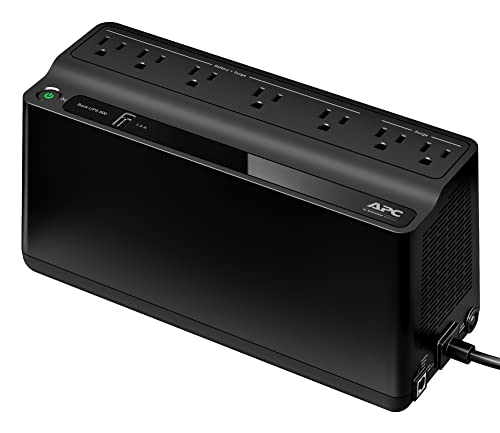
APC BE600M1 UPS Battery Backup & Surge Protector for Computer, Rout...
View available specifications and buying considerations.

APC BE425M UPS Battery Backup and Surge Protector for Small Electro...
View available specifications and buying considerations.

GOLDENMATE 1000VA/800W Lithium UPS Battery Backup & Surge Protector...
View available specifications and buying considerations.

GOLDENMATE 1000VA/600W Lithium UPS Battery Backup & Surge Protector...
Battery capacity (Wh): 153.6

GOLDENMATE 1000VA/800W Lithium UPS Battery Backup & Surge Protector...
Battery capacity (Wh): 230
SmallEnterpriseD may earn a commission from qualifying purchases. This article is based on documented research and product data, not claimed hands-on testing.