
Solar chargers span a wide range: from pocketable “solar power banks” with a small panel to fold-flat panels designed to top off a battery, to compact power stations intended to run laptops or small appliances. Choosing the right unit requires matching the battery capacity and output specifications to the devices you want to run, understanding how and how fast the unit can be recharged by solar, and checking battery chemistry and protection systems for long-term reliability. This guide translates the product facts manufacturers publish into practical buying steps and checks, using representative product claims where they appear in the verified product information. Where a specification is not provided in the product data, I explain exactly what you should verify before buying.
Key takeaways
- Match Wh (watt-hours) and continuous output (watts) to the device you plan to run; Wh determines how long, watts determine whether the device will run at all.
- If you expect to rely on solar recharging, buy a unit with a documented solar input rate and pair it with a panel sized to that input; treat built-in tiny panels as emergency topping, not primary recharging.
- Prefer LiFePO4 (LFP) or clearly documented battery chemistries and cycle-life claims if you want multi-year service; verify manufacturer cycle ratings and what end-of-life means (e.g., capacity at 70%).
- Check ports (USB‑C PD, USB‑A, AC) and whether the AC is pure sine wave, continuous vs peak output, and if pass-through charging (charge & discharge simultaneously) is supported.
- Confirm safety and durability details—BMS features, ingress protection/IP rating, and whether the solar panel is included or sold separately—before completing a purchase.
1) Types of solar chargers and typical use cases
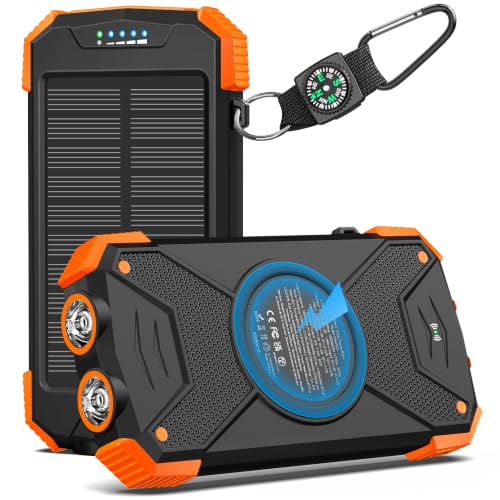
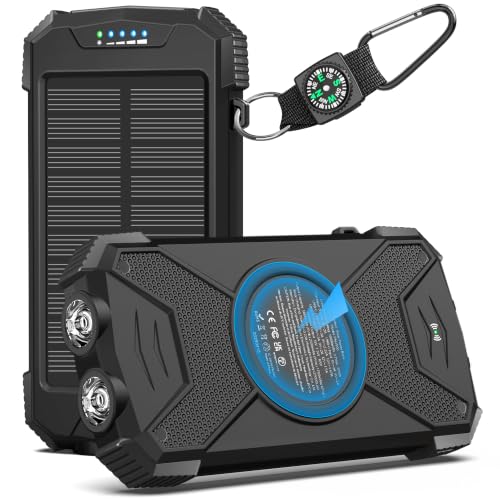
Solar chargers in the market generally fall into three practical categories: (a) small solar power banks with a built-in or tiny panel, intended to provide emergency top-ups for phones; (b) compact power stations (portable battery boxes) that accept external solar panels and supply AC and multiple DC/USB ports; and (c) integrated panel + battery combos sold as “solar generators.” Manufacturer descriptions in the verified data show examples of each: small units like the YELOMIN and BLAVOR power banks emphasize portability and extra features such as flashlights and carabiners; compact power stations such as the Jackery Explorer 300, the ENOFLO 97Wh, and the yewpiny 259Wh units emphasize AC outlets and larger battery capacity.
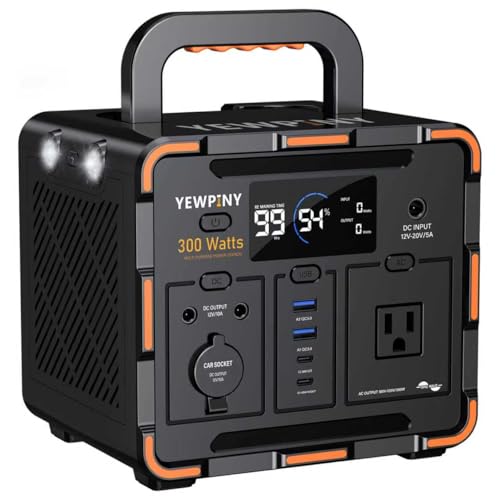
Pick the category first by intended use. If you only need phone top-ups on day hikes, a solar power bank with a small panel (examples: YELOMIN 38800mAh, BLAVOR 10,000mAh claims) can be suitable, remembering the solar panel on such units is primarily a slow backup. If you want to run a laptop, small appliance, or provide extended power in outages, a compact power station with stated Wh capacity and AC continuous watt rating is the right class. In the supplied product facts, the Jackery Explorer 300 (292Wh, 300W continuous, 600W peak) and the yewpiny EM300 (259Wh, 300W continuous, 600W peak) are examples of units that target heavier, multi‑device uses.
2) Capacity (Wh) vs mAh: what to compare and how to convert
Manufacturers sometimes list capacity in mAh, sometimes in Wh. Watt-hours (Wh) tell you usable energy; mAh alone is ambiguous because it depends on the nominal cell voltage used in the conversion. Where both appear, prefer Wh for sizing. For example, the Jackery Explorer 300 lists 292Wh; the ENOFLO lists 97.68Wh (and in product features also states 26,400mAh tied to that Wh). The YELOMIN lists 38,800mAh in its specification—useful for comparison only if you confirm the voltage or the equivalent Wh.
When a product provides only mAh or an unclear mAh figure (some BLAVOR entries have inconsistent capacity fields but list “real-rated 10,000mAh” in features), ask the seller to provide Wh or the nominal battery voltage used to calculate Wh. A practical buying step: write down the Wh of the power station and the watt draw of the device you want to run (device watts ÷ station Wh ≈ hours of run time, ignoring conversion losses). For intermittent or multi‑device use, also confirm the continuous output watt rating and whether the product lists a peak (surge) rating and how long the unit can sustain the continuous load.
3) Output ratings and ports — continuous vs peak and port types
There are two critical output specifications to verify: the continuous AC output (how many watts it can deliver safely for extended periods) and the peak or surge rating (useful for short motor starts). The Jackery Explorer 300 and the yewpiny EM300 both state a 300W rated output and a 600W peak surge—those numbers tell you these units are designed for light appliances, laptops, cameras, and other low‑wattage gear, not high‑draw devices like kettles or full-size space heaters. The ENOFLO lists a 110V AC 120W peak socket, so it’s tailored toward low‑power AC uses.
Also consider the available port mix. USB‑C Power Delivery ports (often shown as 45–100W or specific PD ratings) are important for fast charging laptops and modern phones. Jackery lists a 100W USB‑C PD port; yewpiny lists PD65W and PD36W ports; ENOFLO lists an 18W USB‑C. Small power banks (BLAVOR, YELOMIN) highlight USB‑C and wireless Qi features. Verify whether the AC output is a pure sine wave if you plan to power sensitive electronics—yewpiny explicitly calls its 300W output “pure sine wave” in the product features; if a product does not specify, request clarification.
4) Solar charging: panel wattage, input ratings, and realistic recharge expectations
Solar recharge effectiveness depends on the power station’s rated solar input and the panel(s) you pair with it. Jackery supplies example recharge times in its features: pairing a 100W panel reaches 80% capacity in approximately 2.8 hours (Jackery’s stated figure), while a 40W panel would reach 80% in about 7.5 hours per the product description. yewpiny and ENOFLO also note solar charging support; yewpiny lists a 100W panel as the recommended option for faster renewable recharging. These manufacturer examples underline a practical rule: larger panels reduce sunlight-to-battery recharge times, but exact times depend on panel output, sun angle, shading, and the unit’s solar input limits.
Small units with built-in or tiny panels (YELOMIN and BLAVOR) explicitly warn that the onboard solar cell is best treated as a supplemental or emergency input. YELOMIN’s features say a full solar recharge may require dozens of hours of effective sunlight and to treat the solar feature as a backup, not a primary charging method. If your intended use is long-term off-grid reliance on solar, buy a power station with clearly stated solar input capability and budget to buy an external panel rated to supply that input; also ask whether the unit’s charge controller is MPPT or PWM if you want better charging efficiency (this detail is not provided in the supplied product facts, so verify with the seller).
5) Battery chemistry, cycle life, and longevity
Battery chemistry affects longevity and performance. The verified products include LiFePO4 (LFP) and lithium‑ion chemistries. Jackery specifies a LiFePO4 battery and claims over 4,000 charge cycles before reaching 70% capacity; yewpiny also lists LiFePO4 with a manufacturer claim of 3,000+ cycles; ENOFLO lists standard lithium‑ion with a cycle life claim of greater than 1,000 cycles in its features. Those are manufacturer-provided lifecycle claims—use them to compare expected longevity but confirm what a cycle is defined as and whether the stated cycles are to a specific remaining capacity.
For small power banks, the BLAVOR features reference a “Lithium‑cobalt” battery with higher cycle counts compared with unspecified Li‑polymer alternatives and claim the unit is “real-rated 10,000mAh,” while YELOMIN gives a high mAh number but warns that the solar panel alone is slow for full recharges. If long service life and many charge cycles are important to you (for heavy everyday use or long-term emergency kits), favor LFP units where available or ask the manufacturer for a documented cycle-life test and warranty coverage that aligns with your expected usage.
6) Safety, durability and practical features to check
Safety and ruggedness features are often listed in the product descriptions. ENOFLO calls out a Battery Management System (BMS) that handles voltage and temperature control and automatic shutdowns for short circuits and overloads. The yewpiny product lists multiple protections (short circuit, over‑current, over‑voltage, overload) and an intelligent cooling system. BLAVOR highlights flame‑retardant ABS/PC housing and an IPX5 waterproof claim; YELOMIN notes protective port covers against dust and splashes. These are useful indicators, but you should verify specific certifications (UL, CE, etc.) and ask the seller for test documentation if safety certifications are important to you—such details are not provided in the supplied product facts.
Practical extras matter in real use: built-in handles (Jackery, yewpiny), very small packed sizes (ENOFLO claims 5.7 x 4.4 x 4.1 inches), flashlight and SOS modes on smaller units (ENOFLO, BLAVOR, YELOMIN), and whether panels are included or sold separately (Jackery and yewpiny frequently note “solar panel optional”). Confirm whether the package contains panels and mounting hardware or whether those are add-ons, and whether the product can charge devices while being charged (pass-through). The yewpiny listing mentions pass-through charging support; confirm this capability with the manufacturer when it’s critical for your use case.
What to check before choosing
- Confirm the battery capacity in Wh (not only mAh) and list the continuous AC watt rating; ensure device watts < continuous rating.
- If you plan to recharge with solar, verify the battery’s maximum solar input (watts) and buy a panel sized to that input; confirm whether the solar panel is included or optional.
- Ask for the battery chemistry and cycle-life specification (manufacturer cycle count and the remaining capacity at end-of-life). Prefer explicit LiFePO4 (LFP) claims for long-lived use.
- Check port types and power delivery specs (USB‑C PD wattage, AC type/pure sine wave, number of simultaneous outputs) and whether pass-through charging is supported.
- Verify safety features and certifications (BMS details, over-current/short protection, and any third‑party safety marks) and inquire about IP or water/dust resistance if you will use the unit outdoors.
- Confirm the physical weight and dimensions and whether the unit includes handles, mounting options, and accessories you need (cables, car charging adapter, panel connectors).
Final considerations
Choosing a solar charger comes down to matching three things: how much usable energy you need (Wh), the continuous power your devices draw (watts), and how you plan to recharge the battery (AC, USB‑C, solar panel). The verified product descriptions show the range of approaches manufacturers take: compact power stations such as Jackery Explorer 300 (292Wh) and the yewpiny EM300 (259Wh) emphasize multi‑port outputs and solar readiness; smaller banks such as the BLAVOR and YELOMIN models prioritize portability and emergency topping from solar. When shopping, insist on Wh ratings, clear solar input specs, battery chemistry and cycle-life details, and explicit output/port ratings (including whether AC is pure sine wave). Treat built-in tiny solar cells as supplements, not primary charging methods, and verify safety controls and warranty terms before purchase. Following the checklist above will help you pick a unit that fits both your power needs and realistic expectations for solar recharge and longevity.
Frequently asked questions
How do I convert mAh to Wh and why does it matter?
mAh is a capacity unit for cells that requires a reference voltage to convert to Wh. Wh = (mAh × nominal voltage) ÷ 1000. Manufacturers that list Wh give you direct, usable energy to compare between models; for example, the Jackery Explorer 300 lists 292Wh, and ENOFLO lists 97.68Wh. If a product only lists mAh (as some small power banks do), ask the seller for the equivalent Wh or the nominal battery voltage used for the calculation so you can compare apples-to-apples.
Can I rely on the small built-in solar panel to fully recharge a power bank?
Most product descriptions for pocket solar power banks (see YELOMIN and BLAVOR features) explicitly state the on-board solar cell is slow and intended as an emergency or supplemental input. YELOMIN notes a full solar recharge may require dozens of hours of effective sunlight and recommends charging by USB‑C before trips. If you expect solar to be your main recharging method, choose a power station with a documented solar input rating and pair it with an external panel sized to that input.
What advantage does LiFePO4 (LFP) offer and which products use it?
LiFePO4 (LFP) chemistry is commonly promoted for higher cycle life and longer calendar life compared with some other lithium chemistries. In the verified product facts, Jackery’s Explorer 300 identifies LiFePO4 and lists a claimed >4,000 charge cycles to 70% capacity; the yewpiny EM300 also lists LFP with a manufacturer claim of 3,000+ cycles. Use these manufacturer claims as one factor when evaluating longevity, but also verify warranty terms and whether the cycle count refers to reaching a specific percent of original capacity.
How do I estimate solar recharge time for a power station?
Start with the battery Wh and the maximum solar input the unit accepts. Manufacturer examples are useful: Jackery states a 100W panel reaches 80% in approximately 2.8 hours for the Explorer 300 and a 40W panel reaches 80% in about 7.5 hours (manufacturer-provided figures). Divide the battery Wh by the effective panel output into the battery (accounting for real-world losses, typically 50–85% of panel nameplate depending on conditions) to estimate hours. Because the supplied product facts don’t include detailed solar input for every model, request the rated solar input (in watts) and whether the unit uses MPPT for a more efficient charge controller.
Is the AC output safe for sensitive electronics like CPAP machines or laptops?
Two things matter: the continuous AC watt rating and whether the inverter produces a pure sine wave. The Jackery Explorer 300 and yewpiny EM300 list 300W continuous output and 600W peak—these are aimed at laptops and similar gear; yewpiny explicitly states “pure sine wave,” which is preferable for sensitive electronics. For medical devices such as CPAPs, confirm the continuous watt draw of the device and whether the manufacturer of the power station endorses use with that medical equipment. If a product description doesn’t state pure sine wave or an authorized medical use, ask the seller for clarification and any applicable suitability guidance.
What should I do if a product listing omits important specs?
Treat omissions as prompts to request specific information from the seller: ask for Wh if only mAh is given, request the maximum solar input and connector type if you plan to use solar, ask whether the inverter is pure sine wave, and request documented cycle-life figures and safety certifications (BMS details, UL/CE marks). The supplied product facts highlight that some models are sold with panels optional—confirm whether panels are included or sold separately and whether accessories (cables, car adapter) come in the box.
Explore relevant products
Review available source details and compare products that relate to this guide.

Jackery Explorer 300 Portable Power Station,292Wh | Backup LiFePO4...
View available specifications and buying considerations.

ENOFLO Portable Power Station, 97.68Wh Solar Generator | Lithium Ba...
View available specifications and buying considerations.
300W Portable Power Station, Solar Generator 259Wh, 17500mAh LiFePO...
View available specifications and buying considerations.

YELOMIN 38800mAh Solar Power Bank, Portable Charger USB-C Fast Char...
View available specifications and buying considerations.
SmallEnterpriseD may earn a commission from qualifying purchases. This article is based on documented research and product data, not claimed hands-on testing.