Solar charging remains one of the most appealing off-grid charging options for emergency radios and small power banks, but cloudy weather complicates expectations. This guide explains what changes when the sky is overcast, how to set realistic goals for recharging devices designed for emergencies (radios with built-in batteries, small power banks, and multi-input units), and what to verify on product specs before you buy. It also covers practical placement, charging strategies that combine solar with other inputs (USB-C, hand crank), and simple power-conservation tactics that stretch limited energy. Examples are drawn from verified product facts in the supplied dataset so you can see how those specifications map to real-life use planning.
Key takeaways
- Treat built-in solar panels on emergency radios as supplemental/trickle chargers — verify panel wattage and manufacturer charge-time claims before expecting full recharges in cloudy conditions.
- Prioritize essentials: charge phones and a single radio/light first, and use hand crank or USB-C fast charging when sunlight is weak.
- Optimize placement: move panels into the brightest available area, keep them clean and tilted for diffuse light, and avoid shading even in partial cloud cover.
- Choose devices with multiple charging methods (solar + USB-C + hand crank) and clear manufacturer specs for battery capacity, input voltage/current, and any stated solar recharging times.
How cloudy conditions change solar charging behavior
Solar panels produce electricity from sunlight hitting their active surface; when direct sun is blocked by clouds the available light becomes diffuse and the panel’s output drops. For small, built-in panels on emergency radios and compact power banks, that reduced input typically means much slower charging or only a small top-up over several hours. Several products in the supplied dataset include built-in solar panels as one of multiple inputs, and one product description explicitly notes that "charging performance varies with sunlight, cranking speed, and usage conditions," which aligns with the expectation that output is variable and often significantly lower under overcast skies.
Because most small emergency devices use modest solar cell areas to keep the package compact, they are designed primarily for maintenance charging (replacing a little used capacity) or slow emergency replenishment rather than rapid recharging from empty. Expect solar to be a supplementary option: useful for topping up a battery, extending runtime for lights and radio, or keeping a device alive for longer during a multi-day outage, but not a replacement for mains charging or higher-power solar panels unless the manufacturer specifies otherwise.
Set realistic expectations for small emergency radios and power banks
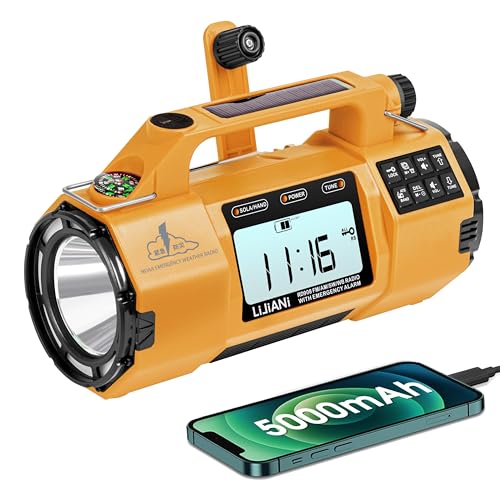
The dataset includes devices with a wide range of battery capacities — examples include 2,000 mAh (RunningSnail), 2,600 mAh (BAIJIALI), 5,000 mAh (LIJIANI), 6,000 mAh (Trecol), 10,000 mAh (Rychi) and 22,000 mAh (Semmorn). In cloudy conditions, a built-in panel on any of these units will generally provide only a fraction of the charging power you’d see in direct sun. Where manufacturers provide charge-time or runtime claims, treat those as ideal or averaged estimates; for instance, one listing states a full recharge time of "approximately 5–6 hours" (manufacturer claim for a specified unit), and another lists radio playback hours for a single full charge, but those figures depend on how the battery was recharged and will be longer if relying primarily on weak solar input.
If your priority is keeping communication and basic lighting available during extended cloudy periods, lean toward devices that explicitly include multiple charging methods. Several products in the dataset combine solar with USB-C input and a hand crank — both valuable redundancies. Hand crank generators are slow and labor-intensive but reliable; USB-C input often provides the fastest recharge when mains or a high-capacity portable battery is available. Verify what the product supports and how the manufacturer recommends mixing those charging modes.
Practical charging strategies during cloudy weather
Start by prioritizing what must stay powered. Your phone (for calls/text and mapping), a NOAA-capable radio for weather alerts, and a light source should get top priority. Many models listed include IO options and features you’ll want for prioritization: USB output for phone charging (present on most products in the dataset), NOAA/AM/FM/WB reception for alerts (Trecol, Rychi, BAIJIALI, LIJIANI), and basic lighting (flashlight/reading lamp) built in.
When sunlight is weak, combine sources where possible: plug the device into USB-C for the fastest refill if a portable battery or vehicle outlet is available, use the hand crank for immediate emergency power when needed, and allow any available solar input to trickle in as augmentation. If you have a larger separate solar panel or a foldable panel rated for higher wattage, connect it to a device that accepts external solar input — but first confirm the device’s allowed input voltage/current and whether it needs a charge controller or MPPT to manage variability. If the device’s manual is silent about external solar input, don’t assume you can attach arbitrary panels without risking damage.
Placement, orientation, and simple maintenance to maximize cloudy-day output
Even under clouds, location and orientation matter. Place the device’s solar surface toward the brightest section of sky available. While the sun’s direct path is obscured, tilting the panel to reduce the angle of incidence to the dominant light (often toward the brightest horizon) can increase diffuse capture. Avoid shade from trees, buildings, or body shadows. Small repositioning can make the difference between no useful charge and a meaningful trickle.
Keep panels clean and undamaged. Dust, smudges and salt residue reduce the available light the cells can convert; wipe the panel periodically with a soft cloth. Also keep folds and creases (for external panels) out of shadows. For devices with built-in, small panels, try to leave them exposed on a bright windowsill during cloudy days rather than tucked inside a bag. If you routinely rely on solar in variable weather, plan to have a separate, larger foldable panel or an alternative charging method rather than depending solely on compact built-ins.
Choosing the right device: specs and features to verify before buying
When you evaluate an emergency radio or small solar-enabled power bank, look for clear, specific specs: battery capacity (mAh is provided for all dataset devices), listed charging methods (USB-C, hand crank, wireless), any manufacturer-stated solar recharge times, panel wattage or surface area, supported output power (USB-A/C wattage), and warranty. The dataset shows variation: Rychi lists 10,000 mAh and 1.19 lb weight and also provides runtime claims for radio and lights; Semmorn lists 22,000 mAh plus USB-C up to 20W and wireless charging up to 15W. These specifications help you judge whether the device is sized for your needs.
Also verify the device’s supported bands and features relevant to safety: NOAA weather band support appears in several entries (Trecol, Rychi, LIJIANI, others), and some radios add SW reception or Bluetooth. If solar performance in low-light is a priority, ask the seller or manufacturer for the panel’s rated wattage or the device’s accepted solar input voltage/current. If that data is not provided, plan to treat onboard solar as a maintenance option only.
Power-conservation tactics to stretch limited charging opportunities
Software and usage choices can vastly extend how long your stored energy lasts. For phones, switch to airplane mode with Wi-Fi/Bluetooth off unless you need communications, lower screen brightness, and avoid background-intensive apps. For radios, use low-volume listening or prioritise NOAA alert mode rather than constant FM streaming. Built-in reading lamps and flashlights should be used sparingly and with the lowest effective brightness level.
Arrange a charging schedule tied to sun availability: use any available midday brighter windows for short top-ups, then rely on hand-crank or stored battery reserves overnight when clouds thicken. If you possess multiple devices, rotate charging so a single essential device charges to a useful percentage instead of attempting small charge increments on many devices simultaneously. These steps are practical and effective in cloudy conditions where solar input is inconsistent.
What to check before choosing
- Verify battery capacity (mAh) and match it to your needs; the dataset includes 2,000–22,000 mAh examples — larger capacity stores more energy but increases weight.
- Confirm which charging methods are available and prioritized: USB-C input for faster recharging, hand crank for manual backup, and solar for supplemental/top-up charging.
- Ask the manufacturer for the solar panel’s rated wattage or the device’s allowed solar input voltage/current; if this is not provided, assume onboard solar is for trickle charging only.
- Check claimed runtimes or charge times in the product listing but treat them as ideal—look for explicit warranty or support terms (Rychi lists an 18-month warranty in its description).
- Ensure the unit supports the radio bands you need (NOAA, AM, FM, WB/SW) and that features you rely on (SOS alarm, flashlight strength, wireless charging) are clearly specified.
Final considerations
Solar charging during cloudy weather is valuable but limited: for compact emergency radios and portable power banks, built-in panels usually act as slow top-up sources rather than reliable primary rechargers. The devices in the supplied dataset demonstrate sensible design trade-offs — many pair solar with USB-C and manual cranking to provide redundancy. To plan effectively, verify manufacturer specs (battery capacity, solar panel rating, supported input/output power), prioritize which devices you must keep alive, and adopt a charging strategy that mixes available sources while minimizing consumption. Simple steps — placing panels in the brightest spot, keeping them clean, using lower-power settings, and rotating charge priorities — make the difference between marginal benefit and meaningful extended use in overcast conditions. If steady charging under cloudy skies is essential for your use case, consider carrying a larger external panel rated for higher wattage or relying on a device that documents robust solar input specifications rather than depending solely on compact built-in panels.
Frequently asked questions
Will the built-in solar panel on an emergency radio fully recharge the battery on a cloudy day?
Not reliably. Built-in solar panels on compact emergency radios are typically sized for topping up or slow maintenance charging. The dataset shows many units list multiple charging methods (solar, hand crank, USB-C) precisely because solar alone may be insufficient in poor light. If a product lists an explicit solar recharge time, treat that as an ideal-case estimate; otherwise, assume solar will only provide a partial charge in cloudy conditions. For dependable recharging, prioritize USB-C or a larger external panel with known wattage.
Which features should I prioritize if I expect to operate in cloudy conditions?
Choose devices with multiple charging methods (USB-C plus hand crank plus solar), clear battery capacity info, and useful safety features (NOAA radio band, SOS alarm, bright flashlight). For example, several units in the dataset combine solar, hand crank and USB-C; Semmorn adds wireless and higher USB-C power ratings, and Rychi offers a larger 10,000 mAh battery and declared run-times for radio and lights. If cloudy weather is common where you’ll use the device, prioritize a unit that documents supported input power or plan to pair it with a larger external solar panel.
How should I place a small device’s solar panel to get the best output when it’s overcast?
Place the panel toward the brightest portion of the sky, keep it free from shade and clean, and tilt it to reduce steep angles of incidence to the ambient light source. Even small improvements in exposure can increase the trickle charge you’ll receive. For built-in panels, leaving the unit on a bright windowsill or directly exposed during daylight is better than leaving it tucked away. Regularly wipe the panel with a soft cloth to remove dust and smudges that reduce effectiveness.
Are hand cranks a practical alternative to solar in cloudy weather?
Yes — as a backup. Hand cranks provide reliable, on-demand energy independent of sunlight, but they are slow and require physical effort. Many products in the dataset include a hand crank as a third power option alongside solar and USB-C. Use the crank when immediate power is necessary and solar is insufficient, but combine it with power-saving tactics to maximize the utility of the effort you expend.
What should I do if the product listing does not specify solar panel wattage or input specs?
If the manufacturer or seller does not provide solar panel wattage or allowed solar input voltage/current, treat onboard solar as a maintenance/trickle solution only. Before relying on solar for full recharges, contact the seller for technical details or choose a product that publishes those specifications. Alternatively, plan to use an external foldable panel with a known output and confirm compatibility with the device’s input requirements to avoid damage.
Explore relevant products
Review available source details and compare products that relate to this guide.

Emergency Radio Solar with 2 Charging Cables, 22000mWh NOAA Weather...
View available specifications and buying considerations.

10000mAh/37000mWh Emergency Radio, Solar Radio, Hand Crank Radio, N...
View available specifications and buying considerations.

RunningSnail Hand Crank Radio with Flashlight, NOAA/AM/FM Emergency...
View available specifications and buying considerations.

BAIJIALI Handcranked Emergency Weather Radio with 2600mAh | Solar &...
View available specifications and buying considerations.

22000mAh Emergency Weather Radio, Solar Hand Crank, NOAA FM (Orange...
View available specifications and buying considerations.
NOAA Weather Radio Emergency Radio with Hand Crank & Solar Charging...
View available specifications and buying considerations.
SmallEnterpriseD may earn a commission from qualifying purchases. This article is based on documented research and product data, not claimed hands-on testing.