
Charging a laptop from a portable power bank is increasingly practical, but it requires more care than charging a phone. Laptops draw higher power and use a wider variety of charging connectors and protocols, so not every power bank will work with every laptop. This guide explains the technical building blocks that determine whether a power bank can charge a specific laptop, the main classes of portable battery products you’ll encounter, what to check in product specifications, and practical safety and travel considerations. Where product examples are available in the supplied evidence, this guide references their published specifications and feature claims to illustrate real-world product types and trade-offs. If a specification you need isn’t listed for a product, the guide explains what to verify with the manufacturer or retailer before you buy.
Key takeaways
- Match the power-delivery interface (USB‑C PD, AC outlet, or a manufacturer-specific barrel jack) and the bank’s supported power output to your laptop’s charging requirements.
- Battery capacity and chemistry affect how much usable energy you’ll actually get and whether a device is approved for air travel; verify the exact capacity and chemistry claims in the product listing.
- Built-in cables, pass-through charging, and safety features (BMS, overcurrent/overvoltage protection) are convenience and risk-mitigation features worth prioritizing for mobile laptop use.
- For air travel, check the product’s stated TSA approval or watt-hour rating and confirm airline rules — some compact power stations explicitly advertise TSA approval.
How laptop charging from a power bank actually works
At a high level, a power bank is an energy reservoir plus output circuitry that converts the bank’s stored energy into a form a device can accept. For laptops, the two common delivery methods are high‑power USB-C Power Delivery (PD) and an AC inverter built into the bank that supplies mains‑style AC sockets. USB‑C PD negotiates voltage and current between the bank and the laptop so the laptop can draw the power it needs; an AC socket delivers the same type of AC power your laptop’s wall charger normally provides, letting the laptop use its original adapter.
Because the conversion from stored battery energy to the specific voltage and current a laptop requires involves losses, the raw capacity number on a power bank does not translate one‑to‑one into usable laptop runtime. Related considerations include the bank’s battery chemistry and its internal management systems. When a product listing includes chemistry and capacity details, those are important to use when judging real-world suitability and airline compliance.
Main product types you’ll encounter
High-capacity, phone-style power banks with multiple USB outputs: these often advertise very large cell capacities and built-in cables for everyday convenience. The supplied evidence includes two such examples that both state a 50000mAh capacity and built-in USB-C and iOS cables, with a marketed fast-charging output of 22.5W. These units are positioned for multi-device use — phones, tablets and light USB accessories — and their large stated capacity can be useful for topping up laptops that accept USB-C PD at modest power levels, provided the bank supports the required PD profile.
Dedicated laptop power banks and compact power stations: some products are explicitly engineered for laptop use. One example in the evidence is a power bank that lists a 20000mAh capacity with a published capacity in watt-hours and an explicit 100W USB-C output. That device also advertises a retractable USB-C cable, multiple outputs and a TFT display showing live input/output power. Another example is a compact portable power station that lists an 89.6Wh LiFePO4 battery and both AC outlets and USB-C PD outputs; the listing highlights two-way PD charging, AC outputs rated to a stated power limit, and a LiFePO4 chemistry claim. These products are designed to handle sustained laptop loads and often include extra features such as AC sockets and higher power USB-C PD.
Emergency or specialized battery chargers: there are also small emergency chargers that use replaceable or rechargeable AA cells to provide USB power in a pinch. The evidence contains an example that converts four AA-style lithium cells into a USB-C output, and the product listing gives the per-cell energy figure as 3600mWh (with an approximate equivalence to a 2400mAh AA). These are compact failover options but are not equivalent to a dedicated laptop power bank in terms of continuous power delivery or connector compatibility.
What specifications and features to verify before you buy
Output interface and maximum output power: determine whether your laptop charges via USB‑C PD or requires AC via a charger. Verify the bank’s maximum output capability for the relevant port type. The Voltracore example in the evidence specifies a USB‑C port and built-in cable delivering up to 100W; that kind of explicit power rating is the exact information you need to compare against your laptop’s requirement. If a product only lists generic fast charging without explicit PD or output figures, ask the manufacturer for the PD profiles and maximum sustained output for the port you’ll use.
Capacity and battery chemistry: capacity numbers and chemistry affect usable energy, safety, longevity and whether a device is air-travel compliant. Some listings in the evidence show capacity in mAh and/or watt‑hours and state chemistry types such as LiFePO4 (LFP). For compact power stations, the evidence contains an explicit 89.6Wh LiFePO4 claim; for other banks the evidence provides 50000mAh or 20000mAh labels and a 74Wh translation for one model. Confirm that the seller’s capacity claim is expressed in the units you need (mAh versus Wh), because watt‑hours are the better unit for comparing energy for devices that operate at different voltages.
Inputs, recharge method and pass-through: if you need to recharge the bank quickly, check the bank’s input capability. One of the supplied examples advertises recharging through USB‑C at up to 65W and calls out estimated recharge durations with specific adapter power values in its feature copy; another advertises two‑way PD fast charging. If you rely on charging the bank while it powers devices (pass‑through), check whether pass‑through charging is explicitly supported; the Voltracore listing includes pass‑through as a feature.
Safety, monitoring and accessories: look for built‑in protections (overvoltage, overcurrent, temperature monitoring and a battery management system) and convenience features such as a display that shows remaining capacity or live power usage. The evidence contains multiple claims of multi‑shield safety, a three‑year replacement program for some models, and an advanced BMS on the LiFePO4 device. Built‑in cables and retractable or captive cables are convenient but confirm cable ratings (for example, whether a built‑in USB‑C cable supports the power level your laptop needs).
Air travel and portability considerations
If you plan to fly with a power bank, confirm the device’s stated air-transport compliance and check airline and TSA rules. One of the catalog entries explicitly advertises TSA approval in its title; other entries list capacities in watt‑hours. Since regulations about battery transport on aircraft often reference watt‑hours, an explicit watt‑hour figure in the product listing or an explicit TSA approval claim is a crucial item to verify before bringing a unit on board. When a listing lacks a watt‑hour claim, request it from the seller.
Portability also involves weight, size and how the unit fits into your carry system. The evidence includes weight information for some compact power stations and lists built‑in handles and silicone straps as mobility features. Consider whether a built‑in cable or a removable cable better suits your workflow, and whether you need quick recharge capability for the bank itself (some products advertise higher input rates or bundled adapters).
Practical usage and safety tips
Use the right cable and confirm its rating: if the bank lists a built‑in cable or ships with a cable, check that the cable supports the published output level. Voltracore’s listing, for example, describes a 5A-rated USB‑C retractable cable and explicitly ties that cable to its 100W delivery claim. Using lower‑rated cables can limit the power negotiated between the bank and your laptop or may cause cable heating.
Plan for charging logistics and battery management: if the bank offers pass‑through, remember that charging the bank while it powers devices may produce additional heat. Look for explicit pass‑through support and, if present, follow the manufacturer’s guidance on using that feature. For long‑term reliability, follow recommended charge/discharge practices provided by the manufacturer—several products in the evidence highlight built‑in protection systems and multi‑shield safety designs to reduce risks during heavy use.
When to choose a compact power station versus a phone-style bank
Choose a compact power station (with AC outlets and two‑way PD) when you need to power or charge multiple higher‑draw devices, need an AC socket for a laptop’s original charger, or want the assurance of a battery chemistry with longer cycle life and specific safety attributes. The DaranEner compact power station in the evidence lists an 89.6Wh LiFePO4 battery, dual AC sockets, and multiple USB outputs; its feature set positions it as a small generator-style option for laptops and small appliances within its stated output limits.
Opt for a phone-style or laptop-targeted USB‑C power bank when you primarily charge USB‑C laptops and value lighter weight, built‑in cables and higher USB‑C PD power on a per-port basis. The Voltracore listing illustrates this approach by combining a high USB‑C PD output claim with a retractable cable and a TFT display, making it a portable workstation companion for USB‑C PD‑capable laptops. High-capacity phone-style banks that advertise very large mAh figures can also be attractive for multi-day mobile setups, but verify their PD capability and sustained output before assuming they will run a laptop as effectively as a unit designed for laptop loads.
What to check before choosing
- Confirm the bank’s output interface (USB‑C PD, AC outlet, or a vendor-specific barrel jack) and its maximum sustained output for that interface as stated in the product listing.
- Check the product’s capacity and chemistry listing (mAh and/or Wh and any chemistry claim such as LiFePO4) and whether the seller states TSA or airline compliance where you need it.
- Verify whether a built‑in or included cable is rated for the power you need (for example, check for explicit cable current or power ratings in the listing).
- Look for explicit safety features and management systems in the listing (BMS, overcurrent/overvoltage protection, thermal monitoring) and any after‑sales support claims such as replacement programs.
- If you rely on pass‑through charging or fast recharge of the bank itself, confirm the exact input capability and whether the manufacturer documents pass‑through support.
- Ask the seller for any missing numeric claims (PD profiles, watt‑hour rating, recharge input power) before purchase if they are not present in the listing.
Final considerations
Charging a laptop from a power bank is a matter of matching interfaces, power capability and practical trade-offs. The product evidence provided illustrates the range of approaches available — from very large mAh phone-style banks with built‑in cables, to dedicated laptop banks with high USB‑C PD outputs and retractable cables, to compact power stations with AC sockets and explicitly stated chemistry claims. Use the checklist above to confirm a product’s output type and rated power, capacity and chemistry, cable ratings, and documented safety protections. Don’t rely on a generic “fast charging” label; instead, insist on explicit PD or AC output numbers and watt‑hour capacity where airline rules or expected run time matter. When in doubt, contact the seller for the missing technical details you need to ensure compatibility and safe operation.
Frequently asked questions
Can any power bank charge my laptop?
Not necessarily. A power bank must provide the correct type of output and sufficient power for your laptop. Some banks advertise USB‑C PD or an AC outlet and specify the power they can deliver; others list only a generic fast-charge output. Verify the interface (USB‑C PD versus AC) and the bank’s stated maximum sustained output for the port you’ll use. If the listing lacks that information, request it from the manufacturer or seller before relying on the bank for laptop charging.
What role does battery chemistry play in laptop power banks?
Battery chemistry affects safety, cycle life, thermal behavior and sometimes regulatory considerations. For example, one product in the evidence explicitly lists LiFePO4 (LFP) chemistry and highlights longer cycle life and BMS protections. If the seller specifies a chemistry, use that information to evaluate longevity and safety characteristics, and confirm any airline compliance notes tied to the chemistry and capacity.
Are built-in cables reliable for laptop charging?
Built‑in cables are convenient, but they must be rated for the power the bank claims to deliver. One product example specifies a 5A-rated USB‑C retractable cable that the listing ties to its higher output claims. Before relying on a built‑in cable, check the listing for cable current or power ratings; if the rating is absent, ask the seller to confirm whether the cable supports your laptop’s required power.
Can I bring a power bank on a plane?
Some products in the evidence explicitly advertise TSA approval or list watt‑hour capacities. Airline and TSA rules typically reference watt‑hours when determining what batteries are permissible in carry‑on baggage. If you plan to fly with a power bank, confirm the product’s stated watt‑hour rating and any TSA or airline approval claims in the listing, and then verify those claims against your airline’s current policy before traveling.
Is pass‑through charging safe and widely supported?
Pass‑through (charging the power bank while it powers devices) can be convenient, but not every product supports it, and using it may increase heat and stress on the bank. The Voltracore listing in the evidence expressly mentions pass‑through support; for any other product, consult the manufacturer’s documentation to confirm whether pass‑through is supported and whether there are usage or safety recommendations.
Explore relevant products
Review available source details and compare products that relate to this guide.
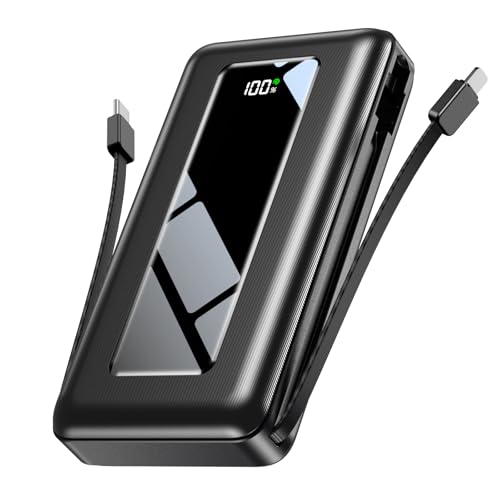
50000mAh Portable Charger Power Bank, Fast Charging with Built in C...
View available specifications and buying considerations.
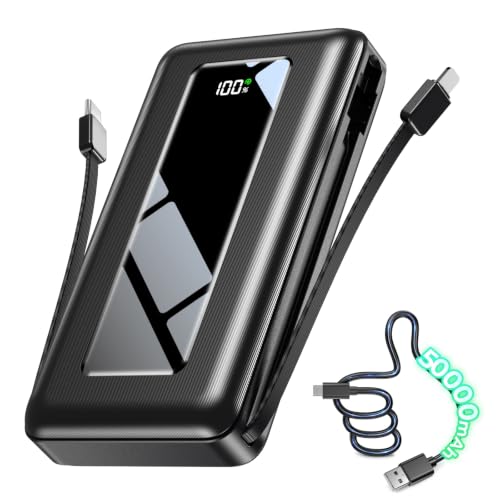
50000mAh Portable Charger Power Bank, Fast Charging with Built in C...
View available specifications and buying considerations.

Voltracore Laptop Power Bank, 20000mAh 3-Port 100W Portable Charger...
View available specifications and buying considerations.


Daran Portable Power Station 89.6Wh LiFePO4 Battery 100W(200W Peak)...
View available specifications and buying considerations.

Portable Power Station 89.6Wh Two-Way Fast Charging with AC 100W(20...
View available specifications and buying considerations.
SmallEnterpriseD may earn a commission from qualifying purchases. This article is based on documented research and product data, not claimed hands-on testing.