
Extended outages pose two linked challenges: keeping the most-critical systems running, and managing available stored energy so you don’t run out at the worst moment. Preparing effectively means matching the right type of backup to the devices you must keep working, understanding how different backup technologies behave (UPS, portable power stations, solar-charged banks, and simple battery lights), and building a plan for charging, maintenance and safe use. The product evidence provided includes small desktop UPS units designed to protect computers and networking gear, portable power stations with LiFePO4 batteries and integrated solar options, compact solar power banks for device-level charging, and simple battery lanterns for reliable lighting. Use those factual product capabilities as examples while you form a plan: which items are protected by battery-backed outlets, which items can be powered from a portable station, how quickly units recharge when supported by AC or solar, and what maintenance steps the manufacturer recommends.
Key takeaways
- Decide first which devices are critical (communications, medical, data) and which are convenience items; choose gear that explicitly lists compatibility for your critical items.
- Match output type and outlet mix to the device: some UPS models separate battery-backed outlets from surge-only outlets, while portable stations provide AC ports and multiple USB options.
- Battery chemistry and rated cycle life matter for long-term readiness—LiFePO4 is explicitly used in multiple portable stations here and is presented by manufacturers as a long-life option.
- Verify charging pathways and realistic recharge behavior—some units include solar panels, some include fast AC charging options, and manufacturers sometimes publish specific recharge benchmarks.
- Plan for maintenance: user-replaceable batteries, periodic recharge during storage, and equipment-protection policies can reduce long-term costs and risk.
Identify and prioritize the loads you need to sustain
Start your plan by listing the devices that must remain operational through an extended outage. Typical high-priority items are two-way communications (phones via a charger or power bank), internet access (modem/router), medical devices that need continuous power, refrigeration for medicines or perishable supplies, and computers or NAS units that contain important data. The APC BE600M1 and APC BE850G2 give an explicit example of the design intent for small UPS units: they “keep your computer, Wi‑Fi and router running through power outages” and are positioned to protect data and connectivity during interruptions.
Once you know which loads are most important, separate them into categories by how they draw power (AC vs DC/USB), how tolerant they are of brief interruptions, and whether they require guaranteed clean sine-wave output. Many UPS units and portable stations list the specific devices they target; use those manufacturer claims as guidance when mapping your list to product capabilities. For instance, APC describes protecting desktops, monitors, NAS and modems, while portable power stations advertise compatibility with appliances such as refrigerators and medical devices in their feature descriptions—match those claims to your needs rather than assuming compatibility.
Choose the right type of backup for each need
Line-interactive or standby UPS units are designed primarily to protect sensitive electronics from immediate interruptions and surges. The APC models in the provided evidence show how UPSes are typically used: multiple well-spaced outlets with a mix of battery-backed and surge-only outlets, built-in USB charging that works during outages, and user-replaceable internal batteries. These traits make UPS units best for keeping routers, desktop computers and NAS devices powered long enough to save work or perform a controlled shutdown.
Portable power stations are a different category: they combine energy storage with AC outlets, USB ports and, sometimes, integrated solar charging. The BROWEY and DARAN units in the evidence are examples of that approach. These devices are presented as suitable for running a broader set of loads and for use outdoors or during extended outages where larger stored energy and solar recharge capability are valuable. Smaller solar power banks and lanterns serve a complementary role: they are simple, lightweight options for keeping phones charged and areas lit, as shown by the Luvknit solar power bank and the Lichamp LED camping lantern in the product set.
Understand battery chemistry, cycle life and long-term readiness
Battery chemistry is a central determinant of long-term value and reliability. Two of the portable stations in the provided evidence explicitly use LiFePO4 (LFP) cells and highlight their lifecycle advantages. The BROWEY unit describes its LiFePO4 battery as a long-life design and states a multi-thousand-cycle benchmark to 80% capacity; DARAN likewise cites LiFePO4 and a multi-thousand-cycle deep-life claim. Those manufacturer statements indicate that, within this product set, LiFePO4 is positioned for extended service life compared with other chemistries.
When planning for extended outages, look for manufacturer guidance on storage and maintenance. DARAN’s product notes advise completing initial charge-discharge cycles for better performance and recommend a schedule for charging during long-term storage (periodic full charges every one to two months). That kind of guidance is useful because it comes from the manufacturer and helps you maintain state-of-charge and battery health while waiting for outages.
Charging pathways, solar options and recharge expectations
Charging options determine how quickly you can restore a unit after use. Among the products cited, there are several charging approaches: AC wall charging, USB-C PD input, car outlet charging, and integrated or bundled solar panels. BROWEY’s description includes built-in solar panels plus an MPPT controller and specifically references combined AC and USB-C PD charging behavior in its feature list. DARAN’s bundle includes a 40W foldable solar panel and describes multiple recharging routes—AC, solar, and car socket—while quoting a manufacturer recharge benchmark for a particular charging pathway.
Not all solar claims are equivalent. The Luvknit solar power bank explicitly warns that its built-in solar panel is intended for emergency trickle charging in direct sunlight and states that solar charging is slow, advising users to fully charge via wall outlet whenever possible. That is practical manufacturer guidance: use solar as a supplemental or emergency method unless the product’s design or stated recharge benchmarks say otherwise. If fast or dependable solar recharge matters for your plan, prefer products that publish specific solar panel wattage, MPPT support, or measured recharge rates in their specifications.
Outlets, ports and surge protection — read the fine print
Product outlet counts and how they are assigned are important practical details. APC’s BE600M1 advertises five well-spaced outlets with full battery backup and two surge-only outlets, while the BE850G2 lists nine outlets with a mix of battery-backed and surge-only outlets plus USB-A charging ports with a shared current rating. That division is not cosmetic: you want mission-critical devices plugged into battery-backed outlets, and less-critical peripherals on surge-only outlets to maximize useful runtime and protect equipment against transient events.
Surge protection and equipment protection policies also matter. APC’s BE600M1 lists a surge energy rating in its features, and the BE850G2 includes a manufacturer equipment-protection policy with a stated dollar coverage for connected devices. Those are explicit manufacturer commitments that can factor into buying decisions when you need both surge suppression and financial assurance against damage from a power event.
Practical setup, maintenance and user-serviceable features
Choose gear designed for easy maintenance if you intend to keep a long-term readiness posture. APC highlights user-replaceable internal batteries for both UPS models, which simplifies end-of-life battery replacement without disposing of the entire unit. The BE850G2 also calls out simple monitoring features—LED indicators and a silenceable alarm—so you can keep tabs on status without complex tools.
For portable stations, check included accessories and manufacturer service policies. The BROWEY and DARAN entries list included cables and, in DARAN’s case, an included 40W solar panel and user manual. BROWEY’s feature list includes an accessory bag and multiple adapter plugs. DARAN provides specific advice on first-time use and storage cycles, which is useful operational guidance originating from the maker rather than inferred by reviewers. Use that manufacturer guidance to set up a rehearsal and maintenance plan so your system performs reliably during an actual outage.
What to check before choosing
- List your critical loads and map each to AC or USB power so you can choose devices with the right outlet types and count.
- Confirm which outlets on a UPS are battery-backed versus surge-only; plug mission-critical gear into battery-backed outlets.
- Check battery chemistry and manufacturer cycle-life statements; LiFePO4 is explicitly used in some portable stations and is described by makers as long-life.
- Review stated recharge pathways and any manufacturer recharge benchmarks (AC, USB-C PD, car charging, included solar panel); decide whether solar is an emergency trickle or primary recharge source.
- Verify user-serviceable features such as replaceable internal batteries, monitoring indicators, and any equipment-protection warranty or connected-equipment coverage.
- Examine included accessories (solar panels, cables, adapter plugs) and manufacturer storage/maintenance recommendations so you can maintain readiness between outages.
Final considerations
Preparing for extended outages requires decisions that balance how much power you need, how long you need it, and how you will restore or conserve stored energy once the grid is down. The supplied product evidence illustrates common approaches: UPS units that protect computers and networking gear and offer user-replaceable batteries and surge protection; portable power stations that pair LiFePO4 batteries with AC and USB outputs and include solar charging options; compact solar power banks and battery lanterns for device-level charging and lighting. Use the manufacturer statements and specifications supplied with each product as factual inputs to your plan: check outlet assignments, verify recharge options and any stated recharge benchmarks, follow manufacturer storage and maintenance advice, and favor serviceable designs if you want a sustainable long-term solution. Preparing is not just buying gear—it's mapping loads, rehearsing a setup, and scheduling maintenance so your chosen backup truly serves you when extended outages occur.
Frequently asked questions
Can a UPS keep my router and computer running during an outage?
Yes—manufacturers commonly position desktop UPS units specifically for that role. For example, APC states that the BE600M1 and the BE850G2 supply short-term battery power to maintain internet connectivity and allow safe shutdown of computers. Check the UPS product page for which outlets are battery-backed and any stated runtime figures provided by the manufacturer so you know how long the unit is designed to support your devices under the conditions they publish.
How do portable power stations with LiFePO4 batteries differ from smaller power banks?
Portable power stations in the evidence (BROWEY and DARAN) are presented as multiport AC/USB devices designed to run a wider range of equipment and to work with solar panels; they explicitly list LiFePO4 cells and multi-thousand-cycle life claims. Smaller solar power banks (like the Luvknit example) are presented as lightweight, device-level chargers with built-in solar for emergency trickle charging and are typically focused on phones and small electronics. Use the manufacturer’s stated capabilities to decide which class of device matches the loads you need to sustain.
Are integrated solar panels effective for recharging during outages?
That depends on the product. In the supplied evidence, BROWEY describes built-in solar panels plus an MPPT controller and explicit multi-input charging behavior; DARAN ships with a 40W foldable solar panel and lists multiple charging routes. By contrast, the Luvknit power bank warns that its solar panel is for emergency trickle charging and advises full charging from a wall outlet whenever possible. Compare the product’s stated solar panel wattage, MPPT capability, and any manufacturer recharge benchmarks to evaluate whether solar is intended as primary recharge or as supplemental/emergency charging.
What maintenance should I plan for stored backup batteries?
Follow manufacturer guidance where available. DARAN’s product notes recommend completing initial charge-discharge cycles for performance and advise fully charging the battery every one to two months during long-term storage. UPS products from APC highlight user-replaceable batteries, which simplifies service when batteries reach end of life. Use those explicit manufacturer instructions to build a storage and maintenance schedule so your backup remains ready.
Does surge protection and equipment coverage matter?
Yes; both surge suppression capability and manufacturer-provided equipment-protection policies can matter when protecting expensive electronics. APC’s BE600M1 lists a surge energy rating and the BE850G2 calls out an equipment-protection coverage amount for connected devices. Those are explicit seller commitments that you can weigh alongside outlet configuration and battery features when selecting gear for outage preparedness.
Explore relevant products
Review available source details and compare products that relate to this guide.
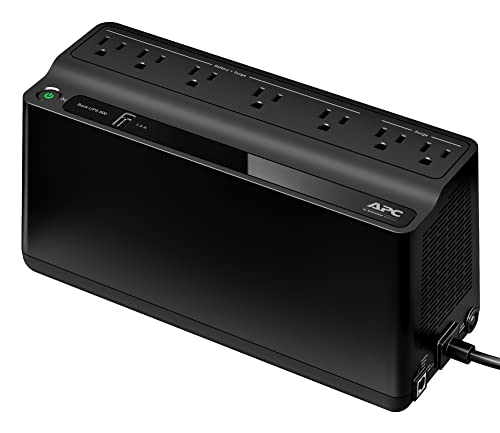
APC BE600M1 UPS Battery Backup & Surge Protector for Computer, Rout...
View available specifications and buying considerations.

APC BE850G2 UPS Battery Backup & Surge Protector for Computer, Rout...
View available specifications and buying considerations.
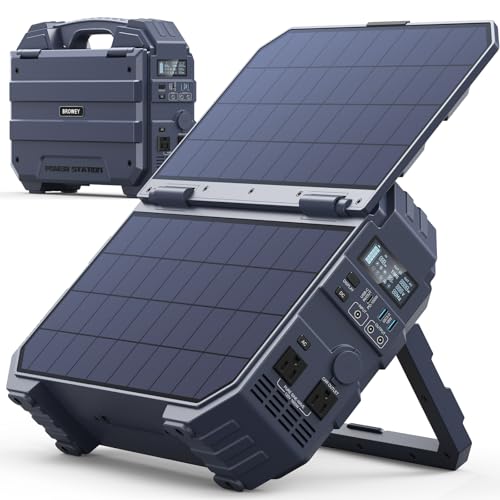
BROWEY 1600W (3200W Peak) Portable Power Station with Built-in Sola...
View available specifications and buying considerations.

Lichamp LED Camping Lantern, 4 Pack Battery Powered Flashlight for...
View available specifications and buying considerations.

Solar Power Bank 20000mAh with USB-C, Portable Charger for Travel C...
View available specifications and buying considerations.

DARAN 350W Portable Power Station with 40W Solar Panel (600W Surge)...
View available specifications and buying considerations.
SmallEnterpriseD may earn a commission from qualifying purchases. This article is based on documented research and product data, not claimed hands-on testing.